Parseable on Kubernetes: Your Logs and Metrics, in Your Own Bucket
On this page
One of Parseable’s customers sends between 150 and 200 terabytes of metrics into it every day. When they moved over, their CPU and memory use dropped by about 40 percent, and they can now look further back in time than they could before.
What makes that kind of volume possible is where the data ends up. Parseable writes everything, logs, metrics and traces, as Parquet files into an object storage bucket you own. There are no big disks to keep growing. Keeping a terabyte in Hetzner Object Storage costs about €6.50 a month.
Most teams aren’t anywhere near 200 TB a day, and the same setup works fine at a few gigabytes. This post shows you how to run it on your own Kubernetes cluster. We wrote it together with the Parseable team, and it takes you from an empty cluster to your own logs and metrics landing in your bucket, using the Parseable stack profile on Ankra.
Why the bucket matters
Most logging setups make you pick one of two bills. Either you keep the data on fast disks in your cluster and pay for every gigabyte of them, or you send it to a hosted service and pay for every gigabyte you send. When the bill grows, the usual fix is to keep less. Then the week you actually need is already gone.
With Parseable, keeping data for a long time is just object storage, one of the cheapest ways there is to store data. The pods only take data in and answer queries, so any of them can be replaced at any time and nothing is lost.
The files are also open Parquet, a format most data tools already read, so you can use them outside Parseable too. Your logs aren’t locked inside one product.
What you end up with
The profile runs Parseable in distributed mode. A few ingestors take in events and write them to the bucket. One querier serves the web console and answers SQL. Everything lives in the bucket, including Parseable’s own metadata.
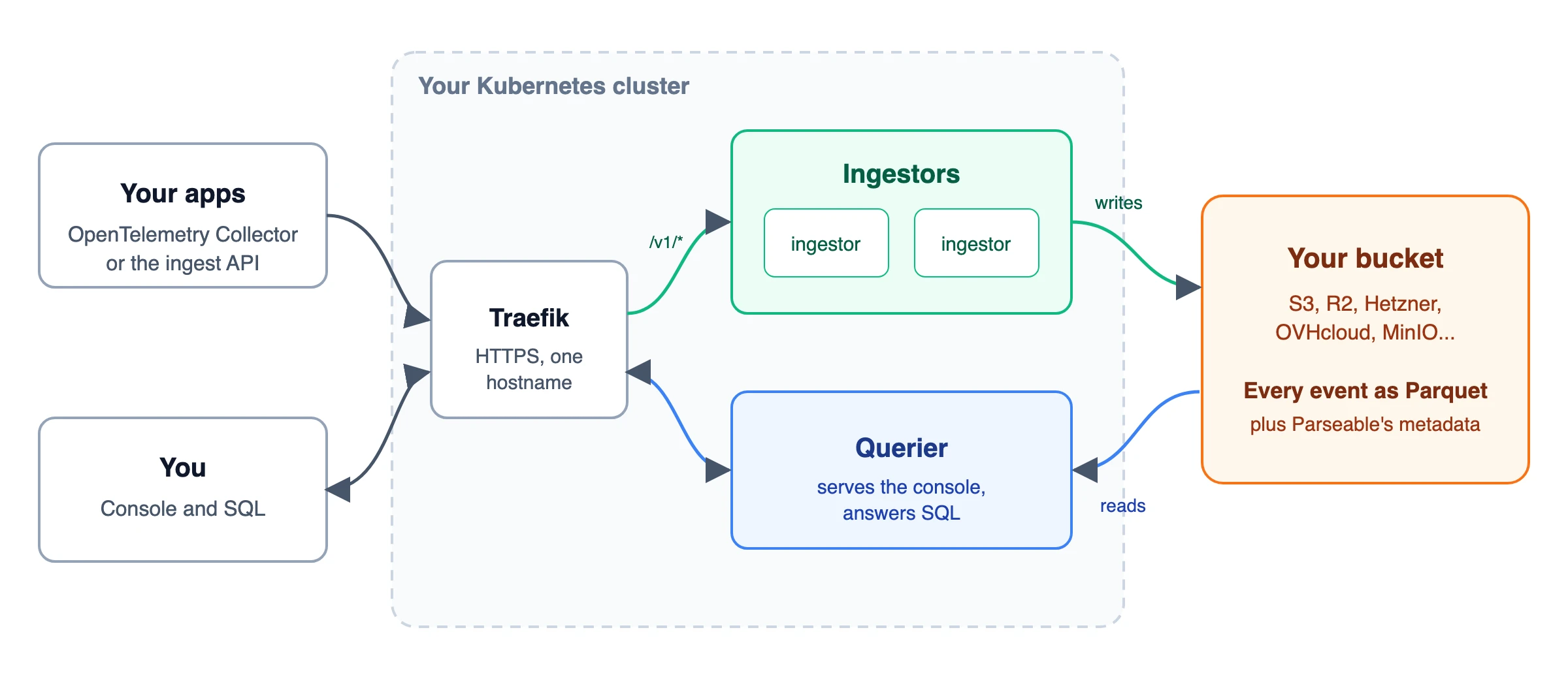
You pick a size when you launch, and it sets the number of ingestors and every CPU, memory and disk figure together.
| Size | Rough daily volume | What it runs |
|---|---|---|
| Small | up to about 20 GB | 2 ingestors (1 GiB each) and a 2 GiB querier. Fits a 3-node cluster of 4 GB nodes |
| Medium | up to about 200 GB | 3 ingestors (2 GiB each) and a 4 GiB querier. The default |
| Large | 1 TB and up | 5 ingestors (4 GiB each) and an 8 GiB querier, spread over at least 3 nodes |
It’s locked down from the start, which is the part that usually takes longest to get right by hand. Your credentials are sealed when you launch and never stored in the profile. A network policy blocks all traffic except from the ingress controller, Prometheus and the namespaces you choose. The querier and ingestors prove who they are to each other with a shared secret. The containers run as non-root on a read-only filesystem, the image is pinned, and Parseable’s anonymous usage reporting is switched off.
Before you start
You need two things.
- A Kubernetes cluster on Ankra. For the small size, three worker nodes with 4 GB each is enough. We tested on three of Hetzner’s 4 GB servers.
- An empty bucket at any S3-compatible provider, like AWS S3, Cloudflare R2, Hetzner, OVHcloud, Scaleway or MinIO.
A cluster Ankra builds for you already has everything else. Traefik takes the traffic, cert-manager gets the certificate from Let’s Encrypt, and the cluster has its own domain with DNS that’s managed for you. On a cluster you imported, you need Traefik, cert-manager with an issuer called letsencrypt-prod (or change it in the form), and a hostname with DNS pointing at your ingress controller.
Step 1. Create a bucket and a key
Create an empty bucket that only Parseable will use. Then create an access key that can read, write, list and delete in that bucket and nothing else.
Some providers, Hetzner among them, give a key access to every bucket in the project. There, put the Parseable bucket in a project of its own, so the key can’t reach anything else.
We use Hetzner Object Storage in Falkenstein in this post, so the endpoint is https://fsn1.your-objectstorage.com and the region is fsn1. If you’d like to be able to go back in time, turn on versioning or object lock for the bucket at your provider.
Step 2. Launch Parseable from the Catalog
In the Ankra portal, open the Catalog, pick Parseable and choose the cluster to run it on. The form asks for what it can’t work out on its own.
- Size. It starts at Medium. Change it to Small to try it out.
- Hostname. Press Use cluster domain and the form fills in your cluster’s own domain. Ankra publishes the DNS record and cert-manager gets the certificate. You can also type a hostname of your own.
- Storage class. Each ingestor keeps a small staging volume where events wait about a minute before they’re written to the bucket. On a Hetzner cluster it’s usually
hcloud-volumes, andankra cluster get storageclasseslists yours. - The bucket. Endpoint, bucket name, region, access key and secret key from step 1.
- An admin login. A username such as
adminand a long random password. - A cluster secret. A shared secret the querier and ingestors use to recognise each other.
- Listen address. Enter
0.0.0.0:8000. It’s an odd thing to put next to passwords, but the upstream chart reads it from the same Secret, so the form asks for it there.
Press Generate next to the password and the cluster secret to get strong random values. Then save every secret on this form in your password manager, the bucket keys included. You’ll sign in with the password in a minute, and Ankra asks for all of them again when you upgrade later.
Launch it. In our test the two ingestors and the querier were running less than two minutes later. You can watch them on the cluster’s page in the portal or with ankra cluster get pods -n parseable.
Prefer the terminal?
The CLI does the same thing. It looks long, but that’s only because each secret gets its own flag. You put the secrets in environment variables and pass their names, so the values never end up in your shell history.
export P_ADDR="0.0.0.0:8000"export P_USERNAME="admin"export P_PASSWORD="$(openssl rand -base64 24)"export P_CLUSTER_SECRET="$(openssl rand -hex 16)"export S3_URL="https://fsn1.your-objectstorage.com"export S3_BUCKET="my-parseable-data"export S3_REGION="fsn1"printf 'Access key: '; read -r S3_ACCESS_KEYprintf 'Secret key: '; read -rs S3_SECRET_KEY; echoexport S3_ACCESS_KEY S3_SECRET_KEY
ankra stack-profiles apply parseable \  --cluster my-cluster \  --set domain=parseable.example.com \  --set storage_class=hcloud-volumes \  --set size=small \  --set-env manifest.parseable-secret.stringData.addr=P_ADDR \  --set-env manifest.parseable-secret.stringData.username=P_USERNAME \  --set-env manifest.parseable-secret.stringData.password=P_PASSWORD \  --set-env manifest.parseable-cluster-secret.stringData.cluster-secret=P_CLUSTER_SECRET \  --set-env manifest.parseable-secret.stringData.s3.url=S3_URL \  --set-env manifest.parseable-secret.stringData.s3.bucket=S3_BUCKET \  --set-env manifest.parseable-secret.stringData.s3.region=S3_REGION \  --set-env manifest.parseable-secret.stringData.s3.access.key=S3_ACCESS_KEY \  --set-env manifest.parseable-secret.stringData.s3.secret.key=S3_SECRET_KEY \  --dry-run
--dry-run shows the value every input would get and creates nothing. When it looks right, run it again with --deploy instead. With neither flag, Ankra creates the stack as a draft you can review in the portal before anything is deployed.
Step 3. Send your first event
Parseable has its own ingest API, and it’s the quickest way to check that everything is wired up.
curl -sS -u "admin:<your-password>" \ -H "X-P-Stream: hello" \ -H "Content-Type: application/json" \ -d '[{"level":"info","message":"first event from my cluster"}]' \ https://parseable.example.com/api/v1/ingestIf you get a 200 back, the event is accepted. Give it a minute before you look for it. The ingestors write what they’ve received to the bucket about once a minute, and that’s where the querier reads from.
Then open https://parseable.example.com, sign in as admin and pick the hello dataset. You can query it with plain SQL too.
SELECT level, message FROM helloNow open your bucket at the provider. Your event is there as a Parquet file, filed by dataset and time, like hello/date=2026-11-02/hour=10/minute=49/. That’s your data, in an open format, somewhere you control.
Step 4. Point OpenTelemetry at it
Most teams already run an OpenTelemetry Collector, or can add one. Parseable takes OTLP over HTTP on /v1/logs, /v1/metrics and /v1/traces, so all you add is an exporter.
Put these next to the otlp receiver you already have. PARSEABLE_AUTH is the output of printf '%s' "admin:<password>" | base64.
exporters:  otlphttp/parseable-logs:    endpoint: https://parseable.example.com    encoding: json    headers:      Authorization: "Basic ${env:PARSEABLE_AUTH}"      X-P-Stream: otel-logs      X-P-Log-Source: otel-logs  otlphttp/parseable-metrics:    endpoint: https://parseable.example.com    encoding: json    headers:      Authorization: "Basic ${env:PARSEABLE_AUTH}"      X-P-Stream: otel-metrics      X-P-Log-Source: otel-metrics
service:  pipelines:    logs:      receivers: [otlp]      exporters: [otlphttp/parseable-logs]    metrics:      receivers: [otlp]      exporters: [otlphttp/parseable-metrics]
The admin login is fine to get going. Once things work, create a user in Parseable that can only send data and give the collector that one instead.
If the collector runs on the same cluster, it can skip the public hostname and talk to the ingestors directly at http://parseable-ingestor-service.parseable. The network policy only lets in namespaces with the parseable-ingest label, so add it to the collector’s namespace.
apiVersion: v1kind: Namespacemetadata: name: otel labels: parseable-ingest: parseableAfter the collector restarts, otel-logs and otel-metrics show up in the console, and their files land in the bucket next to your first event.
Keeping it running
Because nothing important lives in the pods, day-to-day running is mostly hands-off. When we publish a new version of the profile, for example with a newer Parseable, Ankra shows your instance as having an update available, and you roll it out the same way on every cluster that runs it.
The rollout asks for the secrets again, which is why you saved them. From the terminal it’s the command from step 2 with rollout in place of apply, and without the domain, storage_class and size lines, since Ankra keeps those for you.
ankra stack-profiles rollout parseable --cluster my-cluster \ --set-env manifest.parseable-secret.stringData.password=P_PASSWORD \ ... # the same nine --set-env lines as in step 2Your data stays where it is. When we upgraded our test instance, everything sent before the upgrade was still there afterwards, and new events kept coming in.
When you grow into it
The open source edition runs a single querier, and that goes a long way. At some point, though, a heavy query over months of data is more than one machine should carry on its own. That’s where Parseable’s enterprise edition comes in.
In the enterprise edition the query nodes scale out, so a big query is spread over several machines. It speaks PromQL with around 98 to 99 percent coverage, so you can query metrics the way you already do. The ingestors are stateless and scale linearly, so taking in more data means adding pods.
It also comes with Keystone, Parseable’s AI SRE agent. You bring your own model key, from OpenAI, Anthropic or a model you host yourself with vLLM. Keystone turns plain questions into SQL or PromQL, builds dashboards and helps you find the root cause when something breaks. It works through MCP tools, the same approach Ankra takes to let AI agents work with clusters.
Underneath, it’s the same idea as the open source edition. The data is open Parquet in your own bucket, which keeps the cost down and keeps you free to move. To talk about a license, get in touch with the Parseable team.
What’s next
We ran every step of this post on a fresh three-node Hetzner cluster with a Hetzner bucket before publishing it, from the empty cluster to OpenTelemetry data you can query and an upgrade to a new profile version.
Parseable only needs a Kubernetes cluster and a bucket, so this setup runs the same on a big cloud, at a European provider or on your own servers. In a follow-up post with Parseable we’ll look at exactly that, moving off the big clouds without losing your logs and metrics on the way.
Get started: Create a free account on Ankra.
Join our community: Slack
Follow us on: LinkedIn | GitHub
Contact us: hello@ankra.ai
Get the next post in your inbox
Related Posts
Our Logging Stack Worked For Two Years. It Was Also Shipping Logs As Admin.
We turned a production OpenSearch stack into a reusable Ankra stack profile. The parameterisation exercise turned into an audit, and it found credentials that went nowhere, a security config that was never applied, and a retention policy pointed at every index in the cluster.
Prometheus vs VictoriaMetrics: When the Default Stops Being the Answer
Prometheus is the right first monitoring stack for almost everyone, and the wrong last one for a growing minority. An honest comparison of the two, the cardinality wall that forces the question, and how to run either (or both) on Ankra.